> For the complete documentation index, see [llms.txt](https://ap-buddy.gitbook.io/docs/llms.txt). Markdown versions of documentation pages are available by appending `.md` to page URLs; this page is available as [Markdown](https://ap-buddy.gitbook.io/docs/modules/listing.md).
# Listing
## Overview
The Listing Module is used to ensure your products are posted with the desired profit margin, title, and category. The module first removes all VERO products, it then retries parsing for products that might have failed to scan. After, it applies configured profit margins, whether that be tiered-pricing or a flat-rate profit margin. The module then posts to eBay, and if configured to do so, double checks products that failed to post due to category errors. Finally after posting AP Buddy will apply your Shipping, Payment, and Return Policies, as well as your Promoted Listings Percentage, and Round-Up Pricing if enabled.
## Configuration Guide
* **Profit Margin** : Your desired profit margin. Percent and dollar amount both work, just ensure your settings in AP match your desired profit margin type. Attached below is a screenshot of this setting, which can be found in AP's General Settings tab.
* **Amount to List** : The desired number of products to list. Set this to 0 to post your entire import list. (Recommended: 0. The preferred workflow is source the amount you want to post, and post the entire import list.)
* **Note: due to AP errors, parsing failes, etc. the actual amount posted will typically be lower. You may want to set this higher to adjust. This setting is to ensure you never post more than configured. NOT to reach a specific amount of items posted.**
* **If enabled, Amount to Source in** [**Sourcing config**](/docs/modules/sourcing.md) **must be higher than this number.**
* **Skip Posting** : Skips posting to eBay. This allows you to change profit margins, used tiered pricing, and have titles corrected without listing. Useful if you prefer to post yourself.
* **Enable Listing Top-Up** : After listing, will check for errors in the import list, remove them, find replacement items, and re-post them. This will be attempted up to 6 total times, or until less than 20 total errors are found.
* **Round-Up Pricing** : Applies Round-Up Pricing to listings after posting to eBay. Round-Up Pricing will round up the price of products to the next given round up step. The input box supports multiple round-up steps seperated by a comma, or just one (ex: 0.19,0.39,0.59,0.99 or just 0.99). Round-up pricing will choose the next round-up step based on the price the product was listed at.
* **eBay Policies** : Optional. Used to apply your eBay policies after listing to eBay. Set to 0 for AP Buddy to ignore policy application.
* Top 3 Input Boxes are For Policy Names - These are used to grab the policy ID's via the 'Get Policy IDs' button
* Bottom 3 Input Boxes are required for policy application - These are your policy ID's and are used to apply policies after posting to eBay. If AP already handles your policies you can set these to 0.
* **Promoted Listings Percentage** : The promoted listings percent you want applied to new listings.
* **ChatGPT API Key** : OpenAI/ChatGPT API Key - Used to apply missing categories. Roughly $1.20/1000 products.
* **Apply Missing Categories** : Toggle to enable or disable missing category application. **GPTs results have been mixed.**
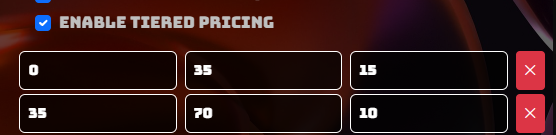
* **Tiered Pricing** : Tiered pricing allows you to configure profit margin tiers based on the product's retail price. This is useful for listing products at a more competitive price while ensuring your margins stay in-tact even if an item is low cost. When enabled, new buttons and input boxes will appear for you to configure it.
.png?alt=media&token=7898844e-a48d-4a23-8acf-b93eb0a1b71b)